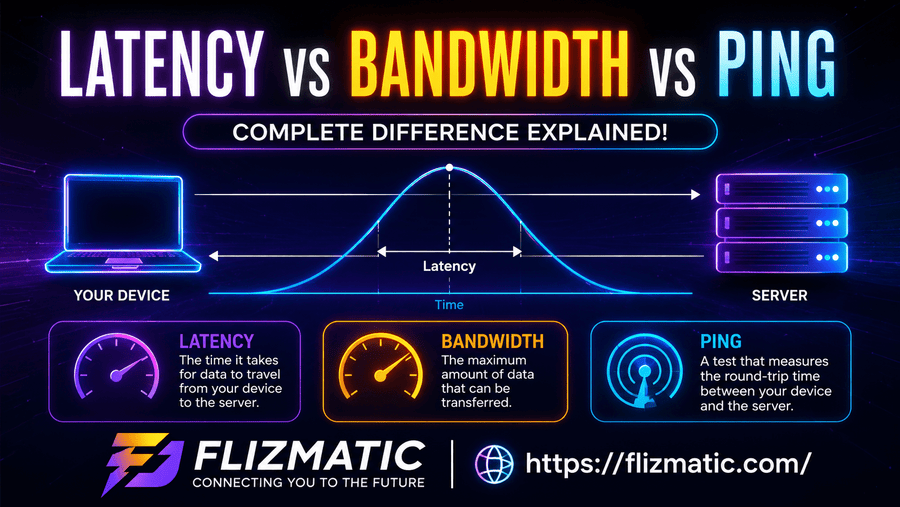
What is Latency vs Bandwidth? Network Speed Explained
The Network Speed Problem: Why Speed Is a Double-Sided Coin
You pay for premium, high-speed fiber internet, yet your video calls freeze, your online games lag, and web pages take seconds to respond. This frustrating issue stems from a common misunderstanding of how data moves across a network. Many users assume that high capacity automatically guarantees instant performance, but network speed is actually determined by two distinct factors working together.
To optimize your connection, you must understand what is latency vs bandwidth and how each metric impacts your daily digital activities. Bandwidth acts as the width of a data highway, while latency represents the speed limit determining how fast a single vehicle travels. Misinterpreting these two concepts often leads to expensive, unnecessary internet upgrades that fail to fix the root cause of poor network performance.
What Is Latency vs Bandwidth? The Direct Definition
Short Answer: Latency measures the round-trip time delay it takes for a data packet to travel from its source to its destination and back, measured in milliseconds ($ms$). Bandwidth measures the maximum capacity or volume of data a network link can transmit over a specific period, measured in megabits per second ($Mbps$) or gigabits per second ($Gbps$).
| Metric | Latency | Bandwidth |
| Core Concept | Time delay (Speed of travel) | Data capacity (Volume per second) |
| Measurement Unit | Milliseconds ($ms$) | Megabits ($Mbps$) or Gigabits ($Gbps$) |
| Analogy | The time a delivery truck takes to reach your house | The total number of lanes on the highway |
| Primary Goal | Minimize to ensure instant responsiveness | Maximize to transfer large files efficiently |
| Impacted By | Physical distance, routing, hardware processing | Infrastructure, hardware limits, ISP throttling |
Demystifying Bandwidth: The Data Highway Capacity
Bandwidth represents the transmission capacity of an electronics communication link (Prasad et al., 2003). It defines how much digital information can pass through a network connection in one second.
- The Pipe Analogy: Think of bandwidth as a water pipe. A wider pipe allows more gallons of water to flow through every second, just as higher bandwidth allows more megabits of data to pass through your router.
- The Highway Analogy: Consider bandwidth as a multi-lane highway. A ten-lane highway accommodates thousands of cars simultaneously without causing a traffic jam, but it does not make individual cars drive any faster.
When you stream a $4\text{K}$ movie on Netflix or download a massive software update from Microsoft, your system relies heavily on high bandwidth to process those large volumes of data smoothly (Prasad et al., 2003).
Unpacking Latency: The Reality of Network Delay
Latency is the time delay experienced in a system, specifically the time it takes for data to travel from one point to another across an internet connection (Alizadeh et al., 2012; Rajiullah, 2015). Even if you have a wide data highway, packets still require time to travel the physical distance between your device and the host server.
Every online interaction requires a request and a response. If you click a link, your browser sends a request packet to a web server, and the server sends the web page data back. The time elapsed during this round trip is your network latency. High latency creates a noticeable, frustrating lag, even if your total connection capacity is massive (Alizadeh et al., 2012; Paolini, n.d.).
The Critical Interplay: How Throughput Fits In
To truly master what is latency vs bandwidth, you must also understand a third related metric: throughput. While bandwidth is the theoretical maximum capacity of your network path, throughput is the actual amount of data successfully delivered over that path in real-time (Prasad et al., 2003).
[ Theoretical Bandwidth (Max Capacity) ]
                 │
                 ▼ (Reduced by Latency, Packet Loss, Congestion)
                 │
[ Actual Throughput (Real-World Performance) ]
High latency can directly degrade your real-world throughput. When latency is high, your devices spend more time waiting for data packet acknowledgments, which slows down the continuous flow of information and prevents your connection from utilizing its full bandwidth capacity (Rajiullah, 2015).
What Causes High Latency on Your Connection?
Several physical and structural factors introduce delays into your network connection:
- Physical Distance: Data cannot travel faster than the speed of light. Connecting to a server across the globe naturally creates higher latency than connecting to a local server (Ramasubramanian et al., 2009).
- Transmission Mediums: Fiber-optic cables transmit data much faster than old copper telephone lines or wireless satellite connections.
- Network Congestion: When too many devices crowd a network path, routers experience buffer bloat, forcing data packets to wait in queues before processing (Alizadeh et al., 2012).
- Hardware Inefficiencies: Outdated routers, poor network switches, and unoptimized network interface cards slow down packet handling.
Why Bandwidth Alone Cannot Fix Online Lag
A common mistake is buying a faster, more expensive internet package to fix online gaming lag or choppy video calls. If your connection suffers from high latency due to physical distance or poor routing, increasing your capacity from $100\text{ Mbps}$ to $1\text{ Gbps}$ will not solve the issue (Patterson, 2004).
A delivery truck driving on a 10-lane highway still takes the same amount of time to travel 500 miles as it would on a 2-lane highway. If your application only transfers tiny packets of data, low latency matters far more than massive, unused capacity (Rajiullah, 2015).
Real-World Impact: Gaming, Streaming, and Browsing
Different online activities place unique demands on your network architecture:
Online Gaming
Gamers require ultra-low latency, often called a low “ping” (Paolini, n.d.). In fast-paced competitive games, a low delay ensures your actions sync instantly with the game server. High bandwidth is unnecessary during gameplay because matches consume minimal data packets (Rajiullah, 2015).
Video Streaming
Streaming high-definition video requires high bandwidth to continuously download large data blocks (Prasad et al., 2003). Latency only matters when you first click play; once the video buffers, minor network delays will not interrupt your viewing experience.
Video Conferencing
Applications like Zoom or Microsoft Teams require a delicate balance of both metrics. You need decent capacity to send clear video feeds, but you also need low latency to prevent awkward conversational delays and frozen screens (Paolini, n.d.).
Practical Ways to Reduce Network Latency
If you want to minimize your connection delays and boost responsiveness, try these actionable steps:
- Switch to an Ethernet Cable: Wired connections eliminate the wireless interference, packet loss, and instability inherent to Wi-Fi.
- Use a Content Delivery Network (CDN): Modern platforms utilize CDNs like Cloudflare or Akamai to cache data on edge servers closer to users, shortening physical travel distances (Ramasubramanian et al., 2008).
- Upgrade Your Router: Modern hardware manages data queues more efficiently, reducing buffer congestion during peak usage (Alizadeh et al., 2012).
- Close Background Applications: Turn off data-heavy downloads and cloud backups to free up your current processing queues.
Summary: Designing the Ideal Network Balance
Achieving an optimal online experience requires balancing both halves of the speed equation. High capacity ensures you can download large files and support multiple household devices simultaneously (Prasad et al., 2003). Meanwhile, minimal delay ensures instant, snappy responses for interactive applications (Rajiullah, 2015).
When diagnosing network performance issues, always check both metrics via an online speed test. Pinpointing whether your system suffers from a capacity bottleneck or a routing delay allows you to make smart, targeted improvements.
Frequently Asked Questions
What is latency vs bandwidth in simple terms?
Latency is the time delay it takes for a data packet to travel a round trip across a network connection. Bandwidth is the total volume capacity of data that the connection can transfer in one second.
Does higher bandwidth mean lower latency?
No, higher bandwidth does not guarantee lower latency. Bandwidth expands the total data capacity of your connection, but it does not accelerate the travel speed of individual data packets across physical distances (Patterson, 2004).
What is a good latency speed for online gaming?
An ideal network delay for smooth online gaming is under $30\text{ ms}$. Latencies between $31\text{ ms}$ and $60\text{ ms}$ are acceptable, while delays exceeding $100\text{ ms}$ cause visible in-game lag and synchronization issues (Paolini, n.d.).
Why is my internet fast but my games still lag?
This issue happens when your connection has high bandwidth but poor latency. Your line can download large files quickly, but the physical path or routing to the gaming server introduces long packet travel delays (Rajiullah, 2015).
How do I check my current latency and bandwidth?
You can easily check both metrics by running a free online speed test through services like Ookla Speedtest or Fast.com. The test displays your download/upload capacity along with your ping time.
Can a VPN improve my network latency?
In most scenarios, a VPN increases your latency because it adds an extra encryption step and routing stop for your data. However, if your ISP is throttling your traffic or using poor routes, a VPN can sometimes provide a more efficient path to the destination server.